Languages

Showing posts with label EN. Show all posts

Friday, February 16, 2018

New Telugu bomb message for iPhones (and how to fix it)

So... Apple screwed up again.

In order to prank your friends send copy the following message into WhatsApp, Mesenger, iMessage or any other app that shows the actual message (without quotes) in the Notification Center: "జ్ఞ‌ా".

And that's it! If he runs iOS 11 his iPhone should have crashed already by now.

Warning! Unlike the last bomb message this one might cause sometimes a reboot loop on his iPhone, do this at your own risk! He might lose all his data if he needs a full restore.

The Notification Center can't render this character in iOS 11 due to a bug and ends up crashing the springboard, which is the main face of the iOS, causing what we call a respring.

How to solve the bootloop:

In some cases the iPhone may get stuck rebooting forever, to solve this you need to get rid of notification that caused it in the first place, without seeing it, do the Following:


COMPUTER:
  • GO TO ICLOUD.COM AND SIGN IN 
  • SELECT “FIND MY IPHONE” 
  • SELECT YOUR DEVICE CLICK ON “LOST MODE” 
  • YOUR IPHONE IS READY: 
  • LOCK SCREEN: 
  • GO TO CAMERA ENTER PASSCODE 
  • GO TO SETTINGS AND TURN OFF NOTIFICATIONS FOR THE AFFECTED APP
  • DELETE ALL THE NOTIFICATIONS 
THE CHARACTER IS REMOVED BY DELETING THE CONVERSATION (OR THE MESSAGE) WITH THE PERSON WHO SENT IT
WHATSAPP:
  • GO TO WHATSAPP WEB 
  • DELETE AFFECTED MESSAGES

The next iOS version 11.3 will solve this bug

Friday, September 13, 2013

Debugging on PhpStorm

PhpStorm is a great IDE for php development, it is powerful, light and fully featured.
Actually I am a fan of all JetBrains IDEs, these guys know exactly what developers want.
It is quite simple to configure it so you can debug your php code, you can add breakpoints, stop code execution, analyze variables. Debugging gives you a whole new level of help while developing. So here's how to do it:

1- Open your php.ini located in your php installation folder.
2- Add the following code, changing folders to your actual php location, this example is for xampp on windows:

[XDebug]
zend_extension = "C:\xampp\php\ext\php_xdebug.dll"
xdebug.profiler_append = 0
xdebug.profiler_enable = 1
xdebug.profiler_enable_trigger = 0
xdebug.profiler_output_dir = "C:\xampp\tmp"
xdebug.profiler_output_name = "cachegrind.out.%t-%s"
xdebug.remote_enable = 1
xdebug.remote_handler = "dbgp"
xdebug.remote_host = "127.0.0.1"
xdebug.remote_port = 9000
xdebug.trace_output_dir = "C:\xampp\tmp"

OBS: under linux or mac, xdebug will be a .so file under /etc/php/extensions folder

3- Restart apache on xampp, this enables Xdebug

If you have trouble enabling Xdebug like this or don't have xdebug installed yet you can use the phpinfo() output to auto-build a config step-by-step for you here: http://xdebug.org/wizard.php

Now for Phpstorm configs:

4 - File > Settings
5- Go to Project Settings > PHP
6 - click ... On the side of the interpreter then + sign
7- Name = Php
8- PHP Home = your php home, ex: C:\xampp\php
9- Debugger = Xdebug
10- Click OK to close dialogs

11- Now go to Run > Debug... > Edit Configurations
12- + sign > PHP Web Application > click ... On the side of server
13- Name = Xdebug, host = your url ex: localhost
14- OK to close dialogs
15- At the toolbar, next to the bug button there is a telephone with a bug next to it and a block sign, click it to enable debugging
16- place a breakpoint in your code by clicking the line number on the left
17- now click the bug icon to start your browser and kill those bugs =)


Monday, September 9, 2013

How to solve iPhone not syncing via Wi-Fi

Some time ago I faced this problem, I wanted to sync my iPhone via Wi-Fi with a windows computer over iTunes, I know iTunes and iPhone have this feature, but even doing everything necessary, it never worked!

As soon as I took my phone out of the cable it could not see my computer on the network anymore and neither my computer did.


What I noticed is that when I closed iTunes, stopped the "Apple Mobile Device" service and started it again my iPhone got instantly detected!

It's too bad that Apple can't fix this, iTunes already had so many updates and yet this problem continues!

The workaround was to build a script that, after my computer started up, it restarted this service and just then launched iTunes.

Here is the script, you can set it to run on boot by placing it in the startup folder under start menu.

If you do not want to run iTunes on boot you can remove the iTunes.exe line before the last one:

https://sites.google.com/site/thinkhackerblog/itunes.zip?attredirects=0&d=1


Wednesday, September 4, 2013

Auto-Killing all unnecessary processes before starting a game

Have you ever been so pissed of with game lagging that you start swinging a cactus?


Well, I have!

Any time when playing a computer game some stupid process grabs my CPU and throws it to shit! Java for instance has something that detects wheter you are in a very crucial moment of the game just to start auto-updating!

The solution that I always adopted was running Task Manager and killing anything that appears there: kill kill kill!!!

And then, just to guarantee, I right clicked my game process and set it to maximum priority.

After some time I built a bat script for killing all unnecessary processes for me and placed it on my desktop, so I can run it whenever I am starting a game.

I also made something special on it, if I drag an exe file onto it it will kill all processes as usual, but then it starts that exe with high priority for me!

And today I am sharing this usefull little script with you! enjoy...


credits go to Bharat Balegere from AgniPulse.com for the first version of this bat

How to get your LG TV to work with any 3D vision capable PC

So, some time ago I decided to go and buy myself a nice 3D TV. I have always been fan of 3D since I was a little child (or not so little anyway).

My idea was to use it so I could play 3D games on the big screen and also watch 3D movies, everybody knows the bigger the screen the better the effect, right??

Well, this was the great start of headaches for me, which I ended up solving one by one and will render some blog posts here after all, so lets start..

Turned out when my TV arrived that my notebook was not 3DTV play compatible, my video card was one of the last ones that 3DTV play was not supported, model 9800M GTS.

But my computer worked well when playing 3D games when I borrowed my brother's 3D vision glasses and a monitor, so there should be some way to do it without using 3DTV play.

The thing is, LG is investing in passive 3D technology, and nvidia uses 3D vision active shutter glasses, so my chances were quite weak because there is a big leap in technology there, think hacker dude, think hacker..

What I found out after some research is that Acer makes passive monitors too, and that 3D vision built some support for these monitors, it works by switching on the passive mode as soon as it detects an Acer monitor.

I realized I had to fake my TV as being an Acer monitor, this was feasible through a driver manipulation  called EDID override, basically, we dump the TV information by using a software (Monitor Asset Manager) then change the EDID for that of an Acer or Zalman's monitor.

You can download EDID override drivers for Acer and Zalman monitors from here: https://sites.google.com/site/thinkhackerblog/passive%20edid%20override.zip?attredirects=0&d=1

You can also try the one I made from my LW5700 TV Dump (Acer Override) here: https://sites.google.com/site/thinkhackerblog/lw5700%20mod.zip?attredirects=0&d=1

I recommend using Acer override since it supports audio via HDMI, something that Zalman's don't.

After you downloaded the drivers you can extract them to a folder, and go to Control Pane; > System > Device Manager. Find your TV there under Monitors, choose driver tab > update driver... and point it to the driver you just extracted. After sucessfully changing your monitor driver your tv will appear as Acer LG TV, yeah, funny..


After I got my driver into working it was time to install the newest drivers for my video card, and also 3D vision. Thing is, why the hell will I need the 3D vision pyramid if I am not going to need 3D vision glasses??

This did not seem necessary at all but nvidia won't let you install 3D vision pack from the drivers if you do not have a pyramid, apparently this would mean less ca$h for them since people will only spend their money with the expensive video cards they make, and not money in useless glasses that do not work with their monitors... Shame on you nvidia!

So here's the trick:

1 - Dowload and install the latest drivers for you video card from nvidia site

2 - Instead of installing the drivers extract them, you can extract exes with winrar

3 - now you can install the drivers for your video card, it won't install 3D vision drivers

4 - download the 3D vision dongle emulator from here: http://kostasoft.com/index.php?mod=pages&page=clone


5 - Extract the archive in a folder, install the device simulation framework on DSFx86Runtime.msi

6 - run init.bat or init_64.bat if your windows is 64-bit

7 - now run enablestereo.bat in order to connect the emulator to the fake USB port, you should have this screen:


8 - OK, you are going to need a driver that works with this emulator, recent drivers do not work, I found out the last one from nvidia that works is the 6.15.12.8562.


9 - now that you got the fake 3D vision pyramid up and running, remember where you extracted the drivers in step 2? Go there you will find a 3D Vision folder, this contains the installation files for the 3D vision package. Install it separately now and you should be all set

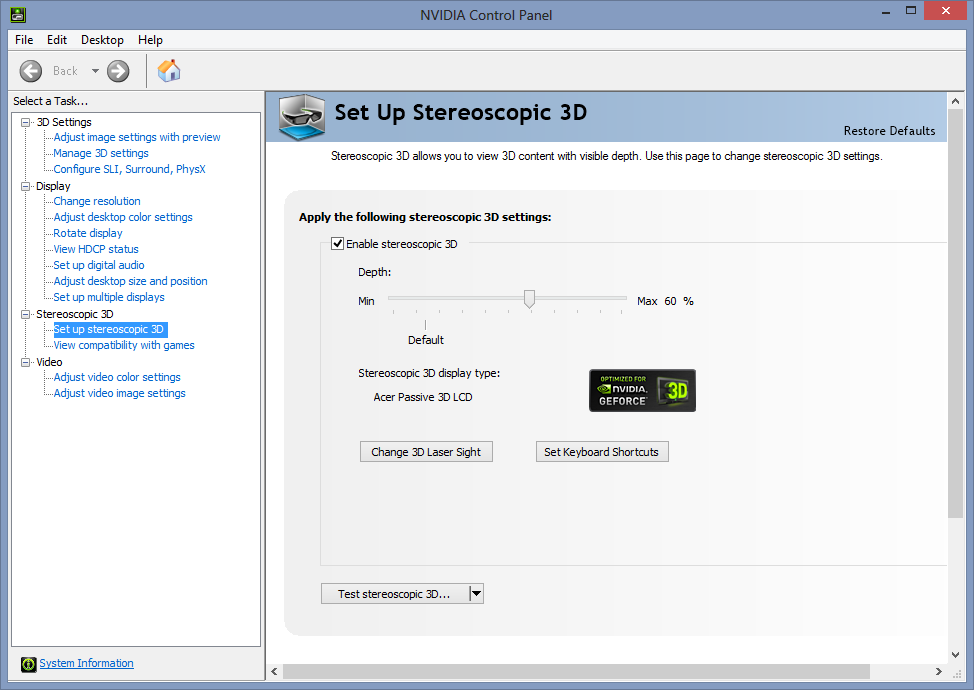
10 - In nvidia control panel, enable stereo 3D in games and test it at maximum resolution, 1920x1080


Note: please note you need to use your games at this resolution for them to work, this happens because the 3D vision, when in passive mode, it just arranges the lines on your TV for first line left eye, second right eye, third left, and so on. 
It might also be necessary to do a little surgery on your glasses by switching the eyes lenses, or you can use them upside down. This happens because Acer Monitors display the eyes per monitor line in a different way than LG.

I also found out that in recent drivers you don't even need to turn on the enablestereo.bat in the future when playing games, you just need it long enough to get your 3D Vision setup running.

Now on to configure your LG TV for best display, through trial and error I found out this config works

1 - Set whatever input you are using for your pc (say hdmi 1) to PC label, yeah, the labels on LG TV do more than just labeling, odd huh?!?

2 - Go to your TV setup menu > picture mode, set it  to expert 1 and now set it like this:

Backlight: 80
Contrast: 100
Brightness: 56
H Sharpness: 0
V Sharpness: 45
Color: 60

These are the settings I found worked best for me, you may try entering a 3D game and adapting it to reduce ghosting (yeah LG 3D TVs suffer a lot from that!)

The latest nvidia driver I had done this was 320.18 driver pack before making this post

Please let me know if this post helps you in some way here in the comments section


Monday, September 2, 2013

How to fix an iPhone in reboot loop

Recently I have been playing with the internal libs of my iPhone, I tryed switching the CoreText with the old iOS 5.1 so I could maybe fix the unicode of death bug.. Hah!

Turned out my iPhone when rebooted started to reboot endlessly, OMG, my real fear was of being forced to do a full restore and lose my jailbreak

Not until i found iPhone Explorer here: http://www.macroplant.com/iexplorer/

This nifty little program will allow you to make changes in the filesystem WHILE PHONE IS REBOOTING

it helped me changing the lib in the filesystem back to the iOS 6, phew..

The unicode of death! At least for the iPhones...


Maybe you might have been surprised by apps in your iPhone suddenly crashing, or even worse, not nopening anymore!

What happens is that a very cool russian hacker group decided to release on the internet a bug that they found out, a few days before the probable release date for iOS7, september 10th, so that some notionless guys can play with it.

- Link to the original post: http://habrahabr.ru/post/191654/

- Link to the Proof of Concept (do not open if on iOS 6 or Mac OSX mountain lion): https://zhovner.com/tmp/killwebkit.html

What they found out was a sequence of special arabic characters, that applied together with a character that glues the text together and another that inverses it, they can cause a WebKit crash, what means that any app that tries to show this text instantly crashes.

According to the news, Apple had been warned about this bug 6 months ago, what makes it a huge slip on their part not to fix it, after all the iOS 6.1.4 came just to correct a little bug in the lockscreen, but this bug has been published on youtube, instead of quietly warned to them.

Here in Brazil, Cid, a blogger for naosalvo blog did a favor to humanity by posting this code on his twitter calling out for Android users to bomb their iPhone friends with this code in whatever network possible.


Cids calling had an amazing repercursion, with people threatening him, and religious guys saying that he has some pact with the demon, also he got lots of publishing in great newspapers here.

For instance, when this special text is sent via whatsapp, since it appears in the notification area it crashes the springboard immediately (iPhones desktop), and now every time you need to open whatsapp it is going to crash because it will try to show the text, how Nice!

In order to save yourself from this it is necessary to reinstall whatsapp so you can erase your history, according to my cousin Lars he was able to recover part of his history by sending whatsapp data into the iCloud and restoring it afterwards.

In iPhone messages this is even worse, you have to kindly ask your attacker to send another harmless message so you can delete the conversation, or send yourself 50 messages, what will push the history away from the screen.

Now to the technical part, if you are afraid of it you may exit now

I decided to spend some time looking at the crash logs and trying to find out what causes this crash, in my opinion, what have been noticed throughout the internet is wrong! This is not caused by coretext, and I can explain why, take a look at this log from my whatsapp:

Exception Type:  EXC_CRASH (SIGSEGV)
Exception Codes: 0x0000000000000000, 0x0000000000000000
Crashed Thread:  1

Thread 0 name:  Dispatch queue: com.apple.main-thread
Thread 0:
0   WebCore                        0x37c298fc 0x379a7000 + 2631932
1   WebCore                        0x37c2690a 0x379a7000 + 2619658
2   WebCore                        0x37c267be 0x379a7000 + 2619326
3   WebCore                        0x37c2a93c 0x379a7000 + 2636092
4   WebCore                        0x37c2a810 0x379a7000 + 2635792
5   WebCore                        0x379ac7c4 0x379a7000 + 22468
6   WebCore                        0x37dd1e98 0x379a7000 + 4370072
7   WebKit                         0x382dab84 0x382d7000 + 15236
8   WebKit                         0x382da5c0 0x382d7000 + 13760
9   WebKit                         0x382da2ec 0x382d7000 + 13036
10  WebKit                         0x382da28a 0x382d7000 + 12938
11  WebKit                         0x382da22a 0x382d7000 + 12842
12  UIKit                          0x33875964 0x33866000 + 63844
13  UIKit                          0x338758a0 0x33866000 + 63648
14  UIKit                          0x338b1328 0x33866000 + 308008
15  UIKit                          0x33874c52 0x33866000 + 60498
16  UIKit                          0x33873a1e 0x33866000 + 55838
17  UIKit                          0x33873858 0x33866000 + 55384
18  UIKit                          0x33872d18 0x33866000 + 52504

It seems clear to me that this crash came from the WebKit instead of the CoreText as people have been saying (I know why, one says and others that do not understand publish)

Come on think with me here, WebKit is open source, the guy can read the code there until he finds the flaw, but in CoreText the guy has to debug assembler shit in order to find a bug, what seems to you the way they found it?!?

I was able to trace the bug to this file in WebKit:
Specifically this function:
adjustGlyphsAndAdvances()

It is possibly already fixed in this recent version of WebKit, because both iOS7 and OSX Mavericks are not affected by this bug.

And here is a lesson for Apple, they thought everything was going to be ok until iOS7 was released, think again, bugs exist to be fixed, especially critical bugs that lead to a DoS (Denial of Service)

EDIT:

For people in Androids to use this, it is better to copy the text from Cids twitter or this one: http://pastebin.com/raw.php?i=AEF3b444

Sunday, September 1, 2013

Hello World

Welcome to my blog,


After a while using computers, I ended up doing lots of stuff, which ended up looking usefull as hell in some way.

I used to limit myself in sharing this stuff and thoughts with my friends, and in some way, those ideas ended up dying, this blog comes not only to organize and document this, but also to help other people trying to do the same things, after all, the world changed since that old modem buzz and beeps.


This blog will not treat only about computers and nerd stuff, well yes lots of computers and nerd stuff but what intrigues me, and also the object of this blog, are people with the hacker thinking.

But what the hell is this hacker thinking thing?

Calm down, I will explain, I consider hacker thinking when a person do not have the usual thougth into following straight, pre-defined lines. Yes this has lots to do with lots of things, not only computers, everything, and I mean EVERYTHING, has more than one way to be done.

Everything is hackable, from your computer to your girlfriend/boyfriend.

Now you must be thinking about the lots of illegal stuff that comes here. Do not worry, despite the fact that I can talk here about lots of stuff which will make this page go offline, I'd rather leave some of that stuff only to myself, because I do.

The most you are going to have is an example of toughts, I intend to show how to I get to conclusions, and why having this alternative way of thinking, I do not intend to limit myself only to computers, even because thats not the only thing in my life.

Oh, and before idiots begin appearing out of nowhere trying to categorize hackers as a special group, most like rockers, emocore, or any other music related groups, stop! I don't consider myself a hacker ok? you can keep up with your group because, in reality I don't really categorize myself in many stuff, this label thing people use and are jealous off is really not my thing..